Contract and benchmark
Health systems and provider groups: benchmark against rates that are actually paid, not just posted.

New in Signal. Most searched codes, checked against claims covering 250M covered lives and refreshed monthly. See which rates are actually paid before you benchmark, model, or contract on them.
Trusted by 200+ organizations across providers, payers, and benefits

Payer Transparency in Coverage files show what a payer says it will pay. They don’t show whether that rate is actually paid, or how often a provider bills for that service. Signal now connects posted rates to claims, so you can see both.

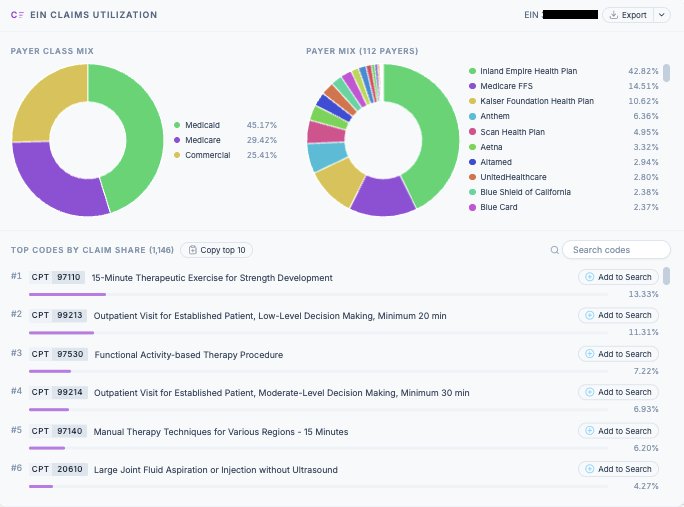
Signal now shows what competitors are billing, and how often, at the organization (EIN) level.

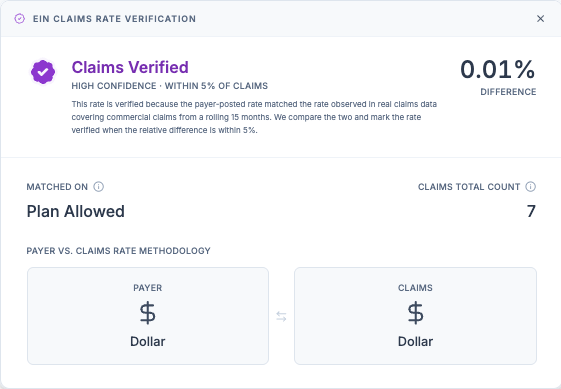
Signal checks payer-posted rates on the most searched codes against commercial claims for the same code and provider. When the two agree, the rate is Claims Verified, and you can see exactly what it matched.
Health systems and provider groups: benchmark against rates that are actually paid, not just posted.
Strategy and finance teams: model expansion, acquisitions, and payer mix on rates backed by real claims.
TPAs, payment integrity teams, and brokers: check paid claims against negotiated rates you can trust.
Health tech teams: build on rate data that's checked against claims, with verification fields available in CSV exports, bulk data deliveries, and the API.
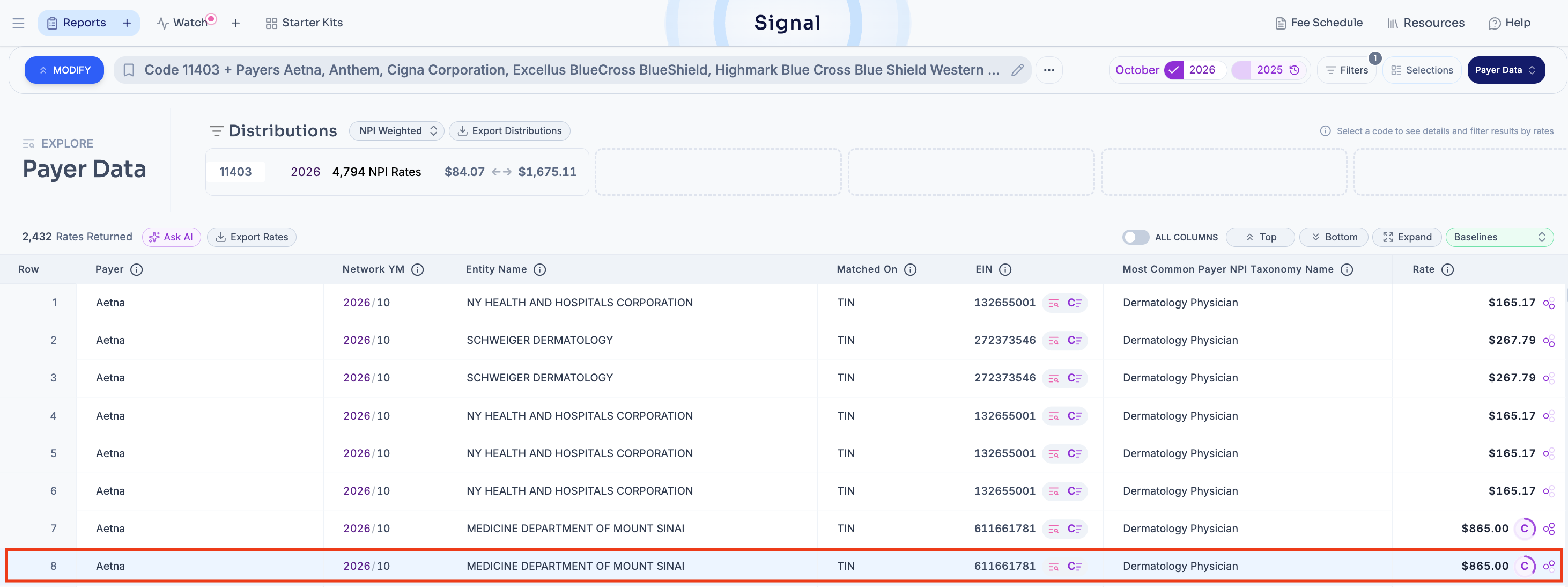
A payer-posted rate is Claims Verified when it is within 5% of the plan allowed or plan paid amount on commercial claims for the same code and provider. In Signal, these rates show a C in the Rate column.
Commercial claims covering 250M covered lives, using a rolling 15 months of data. Each verified rate shows how many claims it matched.
Monthly.
Signal shows the percent difference between the posted rate and the claims rate, so you can see where sources agree and where to look closer.
Run a payer search and look for the purple C badge next to a rate. To see only verified rates, open Advanced Filters and turn on "Only rates within 5% of claims" under Verified by Claims. To include verification details in a CSV export, add the Claims Data Cross Referenced field group. Read the full guide in our help center.
Click the C≡ icon next to a provider's EIN.
The pop-up shows the provider's EIN at the top and has three sections:
From the pop-up, you can:
Book a demo and tell us which organization you want to see. We'll walk through its Claims Verified rates, payer mix, and top billed codes in Signal.